
Ready for a stress-free approach to PDF accessibility?
Simplify ADA compliance by automatically converting all current and future PDFs into screen reader-friendly, WCAG 2.1 AA-aligned HTML transcripts.
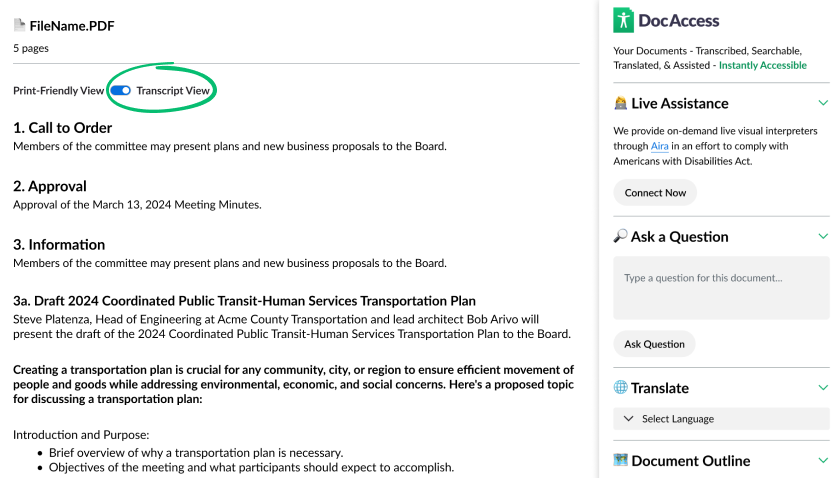
Let Your Users Search, Translate,
Ask Questions & Get Live Assistance
Be ADA compliant while ensuring all users get the great experience they deserve.
Convert to an Accessible Transcript
You can view your document in a print friendly version or turn on the accessible transcript that ensures equal access for people with disabilities, especially those who are blind, low vision, or have motor impairments and rely on assistive technology.
What this solves:
- Handwritten Building Permit Applications — 1987–1988
- Form - Assessment Appeal Application
- Math and Chemistry Homework
- Color-Coded School District Calendar
- Legislation with Tracked Insertions and Deletions
- Complex RFPs with Diagrams and Decision Trees
- Comprehensive Financial Audits
- Multi-Column Brochures with Scanned Maps
- Scanned Legal Documents and Budgets with Handwritten Signatures
Translate to 250 Languages
Allow your site visitors to access your documents in their own language. Includes more than 250 languages, powered by Google Translate.
DocAccess automatically provides statistics on the languages spoken in your service area, and will prioritize those languages in the available options.
Connect to a Live Visual Interpreter
We are both honored and humbled by the challenge of making documents accessible to users with all types of disabilities. However, even with advanced technology, there is still a risk of an access barrier. Because of this, and because of our commitment to providing reasonable accommodation as required by the Americans with Disabilities Act, we offer 24/7 live interpreters via Aira, the leading visual interpreting service. We cover 30 minutes of support, so your users can get the help they need for free. Any accessibility issues are reported back for improvement, providing a valuable feedback loop.
Ask Your Document a Question
With DocAccess, users can ask questions about the documents, saving valuable time and getting the information they need. What was the total budget for Item A? How much more was spent this year vs. last year?
Ask and answered in their own language
Combined with the ability to translate your documents, users can ask questions and get answers in their own language with DocAccess, providing a powerful new way for anyone to learn about the information in your documents.
Navigate with a Document Outline
An essential part of meeting WCAG 2.1 AA guidelines is providing users with a navigational hierarchy of your documents. In addition to automatically detecting and providing semantic headings throughout your documents, DocAccess provides a document outline that allows users to navigate your documents with ease. Sections automatically highlight and smooth-scroll into focus.
Make PDF content mobile-friendly
DocAccess automatically detects and transcribes PDF content to responsive HTML, making content mobile-friendly and accessible to all users.
A Simpler Way to Make Your Documents Accessible
Step 1 Get your report and try your most challenging documents for free!
Experience the power of DocAccess on your own documents. Try it with your screen reader, share with others in your organization, and see how we handle even your most complex PDFs.
Step 2 Review your compliance plan with a DocAccess specialist.
We'll walk through your complete document inventory, test the functionality with you on your site, ensure all of your domains are covered, and provide a proposal tailored to your organization.
Step 3 Onboard and relax.
Our team guides you through onboarding and certifies your site. Your team generally has less than 5 minutes of work—just one line of code, already supported by dozens of platforms. Then sit back as all your current and future PDFs become accessible.Get Started
Designed in partnership with the community

"DocAccess is by far the best solution of its kind on the market today…the PDF problem has finally been solved."
—Carter Temm, NVDA Contributor and Blind Accessibility Advocate

"This is the first tool I've seen in a long time that can back up its accessibility talk with a real solution."
—Shawn Jordison, The Accessibility Guy, and PDF Accessibility Thought Leader
Protect yourself from costly accessibility lawsuits
Accessibility lawsuits in the U.S. have surged in recent years. The most common culprit being an inaccessible document or PDF. Protect yourself from risk and avoid the headache of creating accessible documents or paying for costly remediations.
Join Our Cause & Help Us Test
We need your help and feedback on our mission to make the world's documents more accessible. Join the beta program for free and help us improve this emerging technology so it can live up to its promise.
Frequently Asked Questions
What accessibility standards does DocAccess follow?
DocAccess fully adheres to WCAG 2.1 AA guidelines, ensuring compliance with Section 508 of the Rehabilitation Act, the Americans with Disabilities Act (ADA), the latest DOJ ruling 28 CFR Part 35, and the EU's EN 301 549 accessibility requirements. We also comply with state-specific regulations across all 50 states, including California's AB 434 and Unruh Act, as well as Colorado's HB 21-1110.
Do I still need to remediate my PDFs?
Since DocAccess creates a fully compliant, accessible HTML transcript of your PDFs, this qualifies as an "alternative format" under ADA guidelines. Therefore, your original PDFs generally do not require separate remediation. We have found that users with disabilities typically prefer this interactive format on the website itself, enabling quick navigation and immediate responses to their queries. Legal experts have also supported this position
HTML is not just acceptable, but often preferred. The official Section508.gov guidance on PDFs states that PDFs are often not the most accessible option and that federal policy requires agencies to prioritize HTML and use PDFs only when necessary. section508.gov
How do you ensure accessibility for all users with disabilities?
We are both honored and humbled by the challenge of making documents accessible to users with all types of disabilities.
Live Assistance as a Foundation and Fallback
Understanding that every interpretive technology can fail, we provide 24/7 live interpreting via Aira, the leading visual interpreting service. Calls are free, recorded, and monitored for continuous improvement.
Expert Review
We regularly review high-complexity pages for accuracy. We partner with The Accessibility Guy to ensure that the transcriptions are accurate, complete, compliant with the WCAG 2.1 AA guidelines, and reasonably capture any structural nuances of the original PDF.
Comprehensive Accessibility Testing
In addition to testing in-house, we work with an accessibility partner, LevelAccess to conduct extensive live user testing covering a wide range of disabilities and assistive technologies, ensuring thorough compliance.
Tailored Accessibility by Disability Type
- Visual Disabilities: Our documents follow strict WCAG 2.1 AA standards, optimizing semantic structure for screen readers, alternative text for images, and concise summaries for complex information.
- Auditory Disabilities: Typically, no additional accommodations are necessary for standard documents. However, in an edge case where your document links to multimedia content without captions, we provide ASL interpreting through Aira.
- Cognitive Disabilities: DocAccess simplifies complex documents through intuitive navigation and a user-friendly "Ask a Question" feature that accommodates spelling errors and multiple languages.
- Motor Disabilities: DocAccess is fully operable via keyboard-only navigation and is tested against rigorous standards to ensure compatibility with a wide range of assistive technologies.
Did the DOJ extend the Title II web accessibility compliance deadline?
Yes. On April 20, 2026, the Department of Justice published an Interim Final Rule extending the Title II web and mobile accessibility compliance dates by one year:
- Public entities with a total population of 50,000 or more: extended from April 24, 2026 to April 26, 2027.
- Public entities with a total population of less than 50,000, and any special district government: extended from April 26, 2027 to April 26, 2028.
Importantly, the underlying rule did not change. WCAG 2.1 Level AA is still the technical standard, and the substantive accessibility obligations are unchanged — only DOJ's enforcement timeline moved. Title II also includes a private right of action, so individuals with disabilities can still file ADA claims in federal court regardless of the new DOJ deadline. See the Interim Final Rule (PDF) and our full write-up for context.
Can I exclude archived documents from DocAccess?
Yes. With on-demand transcription enabled, DocAccess will defer transcription of archived or low-traffic documents until they're actually needed—so page credits are only used when a document is transcribed. You can also disable specific documents or URL paths (e.g., /archive/*) to prevent them from being transcribed. Note that pages already transcribed still count against your allowance, since the transcript has already been created.
What payment methods do you accept?
We offer invoicing and accept credit cards, ACH transfers, wire transfers, and paper checks. Payment terms are specified in your agreement.
How does DocAccess count the number of PDF pages on my site?
DocAccess counts the number of PDF pages on your website by crawling your site and counting the number of total number of PDF files. We use your sitemap.xml if one is available to ensure we are counting all of your publicly-accessible pages. After we have a complete listing of your PDF pages, we will analyze each file for the total number of pages, and provide you with a total page count.
What if I link out to PDFs on other websites? Will DocAccess still count and transcribe them?
Yes! One of the unique (and most requested) features of DocAccess is that it will count, track, and transcribe PDFs on other sites that you link directly to, ensuring an accessible experience even on documents that you need to reference but cannot control. Any document linked on your website will be automatically made accessible by default, unless you explicitly disable the document in the dashboard.
Example: if site1.org/important-documents has a link to to site2.org/external-document.pdf, that external-document.pdf will be listed in site1.org's dashboard and will be automatically transcribed for anyone on site1.org who clicks on it.
What if I have really complicated PDFs with maps, diagrams, budgets, and/or handwriting?
Bring it on! DocAccess can interpret almost any type of content. There is no extra charge for complex PDFs. We welcome your most complicated, ugly, seemingly unfixable documents. We see each one as a challenge to make the internet a more accessible place.
Does DocAccess use existing alt text that I've already added to my PDFs?
Yes and no. DocAccess will use your exact alt text on the print-friendly version of the document. However, DocAccess will add more comprehensive alt text to the transcript view to conform to WCAG 2.1 AA guidelines using a best-practices formula to best convey visual meaning.
What if I link to the same document from multiple places on my site(s)?
DocAccess will not charge you twice for the same PDF link. We track each document's fingerprint (specifically, the MD5 hash of the document) to ensure that we only count each document once.
Do we need to archive or delete old PDFs to stay compliant?
Absolutely not. True accessibility means making all information available to everyone, not hiding documents to reduce costs. DocAccess automatically handles every PDF on your site - old and new - without forcing you to restrict public information or make difficult decisions about what content is "worth" making accessible.
Do I need to update my accessibility statement to mention DocAccess?
You do not necessarily need to mention DocAccess by name in your accessibility statement, but we do recommend updating the statement to reflect the accessibility features now available on your website.
For example, your statement can mention that:
Accessible versions of PDF documents are available on the site
Visitors can access screen reader–friendly HTML transcripts
Translation options are available
Live assistance is available if a user needs additional help accessing document content
In most cases, it is better to describe the accessibility support available to the public rather than focusing on the product name itself.
Why am I seeing a Content Security Policy (CSP) error when loading DocAccess?
Some websites use Content Security Policy (CSP) headers to restrict which external scripts can run. If you see an error like "Loading the script violates Content Security Policy directive", your site is blocking the DocAccess script.
Solution: Your website administrator or CMS vendor needs to add DocAccess to the CSP whitelist by including https://docaccess.com in the script-src and connect-src directives.
See our Support Page for a ready-to-use email template you can send to your website vendor.
 Making PDFs Accessible Under Title II of the ADA: A Guide for Public Entities
Article by Stuart Tubis, ADA Attorney
 Do inaccessible documents put
me
Do inaccessible documents put
me Access for All: How DocAccess Advances Digital Equity in the Public Sector
Watch the Sight Tech Global Video